

Foundation Paper Piecing design with EQ8: Virtual Class
If you love Foundation Paper Piecing (FPP), you’re probably familiar with the process of working from a printed pattern to create those wonderfully precise – and sometimes wonderfully complicated – quilt blocks.
But what if you could design your own FPP blocks right on your computer and then easily turn those designs into templates ready to sew? That’s exactly what the new Drawing Foundation Paper Pieced Blocks class from EQ8 is all about.
For those who may be new to EQ8, it is quilt design software created specifically for quilters. It allows you to design quilt blocks and entire quilts, experiment with layouts, work with fabrics and colors, and print the information you need to bring your digital design to life.
the class at a glance
In this class, you’ll learn how to use EQ8’s FPP design tools to create your own blocks electronically, whether you’re starting with an idea, drawing your own design, or even tracing an image.
Once your design is complete, EQ8 makes it easy to print the FPP templates so you can take your digital design straight to your sewing machine and turn it into a fabric block. I decided to take the class myself, and I’m excited to share what I learned!
A Look Inside the Class
The class walks through a variety of techniques and tools for creating your own foundation paper pieced designs, including:
- How to analyze an imported image prior to drawing the block
- How to design an FPP block using an imported image
- How to design FPP blocks using both straight and curved lines
- How to use the Advanced Symmetry options in the Drawing Tools
- How to use the Pick, Edit, Line, and Arc tools correctly
- How sectioning and numbering of an FPP template can be modified
- How to correct mistakes as you design
- How to easily resize your FPP design
- How to save your finished blocks in the My Favorites Library for future use
All of the designing in this class takes place on the Block Worktable, so if you haven’t spent much time there in EQ8, this is a great opportunity to get more comfortable with it.
You’ll learn how the different drawing and editing tools work together, along with some handy features that can make designing your own blocks much easier. Even if you’ve used the Block Worktable before, I think you’ll discover a few tools and tricks you may not have tried yet!
I especially appreciated the tips on using the different drawing tools. Sometimes it’s not that you can’t figure out what you want to do—it’s figuring out which tool will do it! The class helped make those options much clearer.
Pause, Rewind, Repeat
One of my favorite things about the EQ8 online classes is that you don’t have to worry about keeping up with a live instructor. Once you purchase the class, it lives in the My EQ at Home Classes section of your EQ8 account, so you can return to it whenever you need it. That makes it especially handy for a class like this, where you may want to come back later when you’re working on your own FPP design and need a quick refresher on a particular tool or technique.
You can pause, rewind, or repeat an entire section as many times as you’d like. The instructor moves at a nice, steady pace, but if you happen to fall behind, there’s no pressure. Just pause the lesson, back up a little, and go through the instructions again.
And let’s be honest—sometimes I need to see something more than once before it clicks!
Let’s See what we designed
What did we design? Take a look at the block images below. Each one was created using EQ8’s tracing image feature, starting with an actual photo as the guide. Of course, you’re still in control of the final design—you can simplify, change, or rearrange the lines to create the block you want (even flip your design for a mirror image). The photo is simply a starting point and a little inspiration!


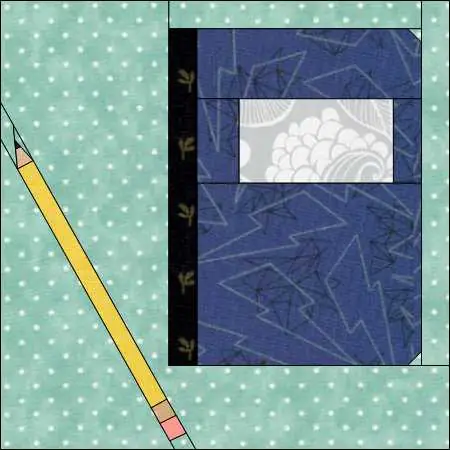
What if you don’t have an image to trace and simply have an idea in your head? No worries! The class also shows you how to start with a blank canvas and create your design using straight lines, curved lines, or a combination of both. Images of the ones we made in class are below.


You’ll learn how to set up your preferences, use the drawing tools, and make sure your design is set up correctly so it can become a workable FPP template. It’s a great way to take that little idea in your head and turn it into a block you can actually sew!
From EQ8 Design to Fabric
Of course, designing an FPP block is only half the fun—you eventually want to turn that design into an actual quilt block! The class also covers the printing functionality, which makes that transition from computer screen to sewing machine much easier.
Once your design is finished, you can print the FPP templates onto foundation paper or freezer paper, depending on your preferred method. I really liked the flexibility you have before sending everything to the printer. If a template falls across multiple pages, you can move the pieces around and arrange them before printing rather than just hoping everything lands where it should.
Even better, you can preview the pattern before printing. This gives you a chance to check the templates and make sure everything looks the way you expect—saving paper, ink, and possibly a little frustration!
It’s a great example of how EQ8 takes you all the way from an idea or image to a finished FPP pattern that you can actually sew.
My Final Thoughts
All in all, I thought this was a great class. Even though I had already experimented with the FPP tools in EQ8, I learned several new techniques and shortcuts that I know I’ll use. The class also answered some of my questions about sectioning and numbering FPP templates, which had always been a bit of a mystery to me when working on a design.
If you enjoy foundation paper piecing and have ever thought about designing your own blocks, I would definitely recommend giving this class a try. It’s a great way to become more comfortable with EQ8’s FPP tools and discover just how much you can do with them.
And because you can access the class anytime after purchasing it, you can keep coming back as you work on your own designs. That’s a great feature!
If you’ve been curious about designing your own FPP blocks in EQ8, this class is definitely worth checking out. You can find more information about this class and the other At Home Classes offered by EQ8 when you click the button below!